Strix Algo / Verified Marketplace ● Live Broker Feed · USD
Step-by-step guide · Example broker: Ultima Markets
From trial key to a robot live on your account.
Free trial key → broker account → deposit bonus → connect. The other two brokers are nearly identical.
5 minutes of reading = 95% of the questions people get stuck on. Start with these two.
Before you start - what to expect
From ~15 minutes - simple, but not instant. The time depends on verification (KYC - usually minutes) and on how you fund:
Deposit method · Time to arrive
Bank card · 1–3 min
Crypto · 5–10 min
ID verification is required by regulators. The broker isn't being difficult, and it's part of what keeps your money safe.
Two kinds of “account”. This is where most people get lost.
Two separate things:
1 · Broker account - your personal profile
Your client area on the broker's site - email + password, in your name. Verification, deposits and withdrawals happen here. It has no MT5 login number.
2 · Trading account - the MT5 account
Lives inside the broker account - the numbered account with the balance. Its MT5 login (a number) is what you connect to the platform.
What does it look like?
Broker account · your personal profile
John Smith
john@gmail.com · verified · one per person
Total at the broker
$27,580
the sum of the trading accounts inside
Inside it - trading accounts (MT5) × 2
MT5
#5214307 ← connect this
RAW ECN · 1:500 · USD
$2,500
MT5
#5198112
Standard · 1:200 · USD
$25,080
One broker account - the outer shell - holds any number of trading accounts inside. Each has its own MT5 number, settings and balance. That number is what you connect.
Your first trading account is created during signup. You just pick its settings.
Pending → KYC + first deposit → Live → MT5 credentials arrive by email
That email is what you're waiting for - those credentials connect your robot.
Step 0 · In Telegram · ~15 seconds · Skip if you're already signed in
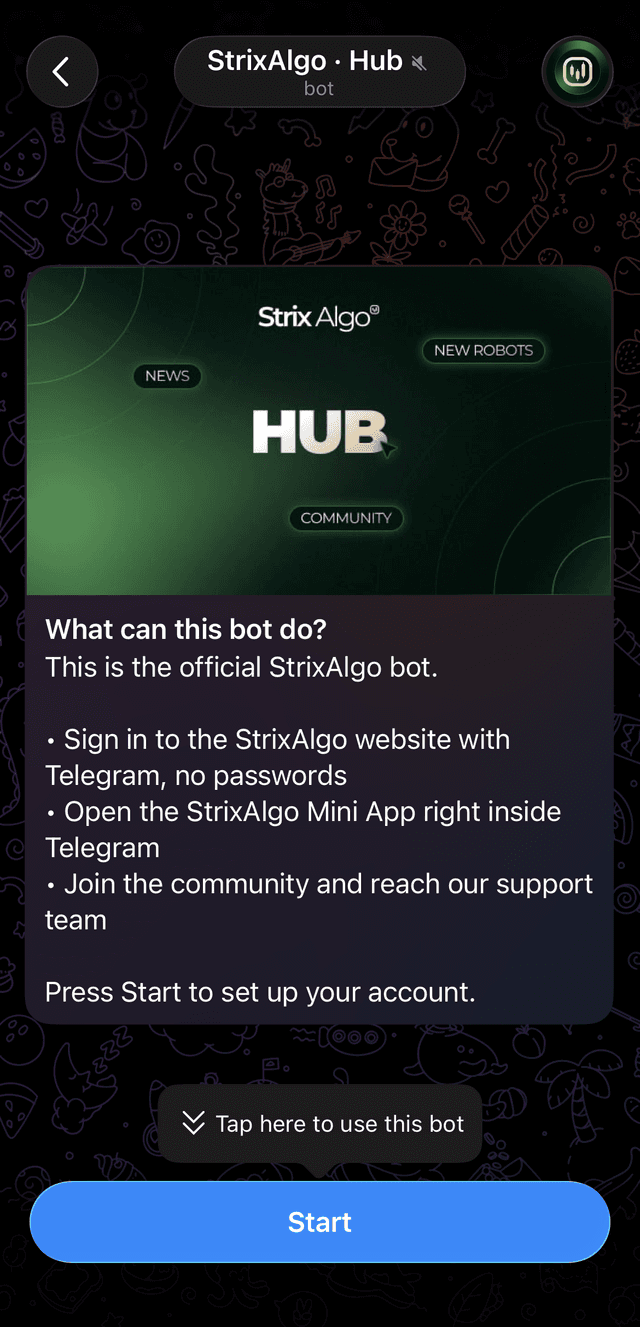
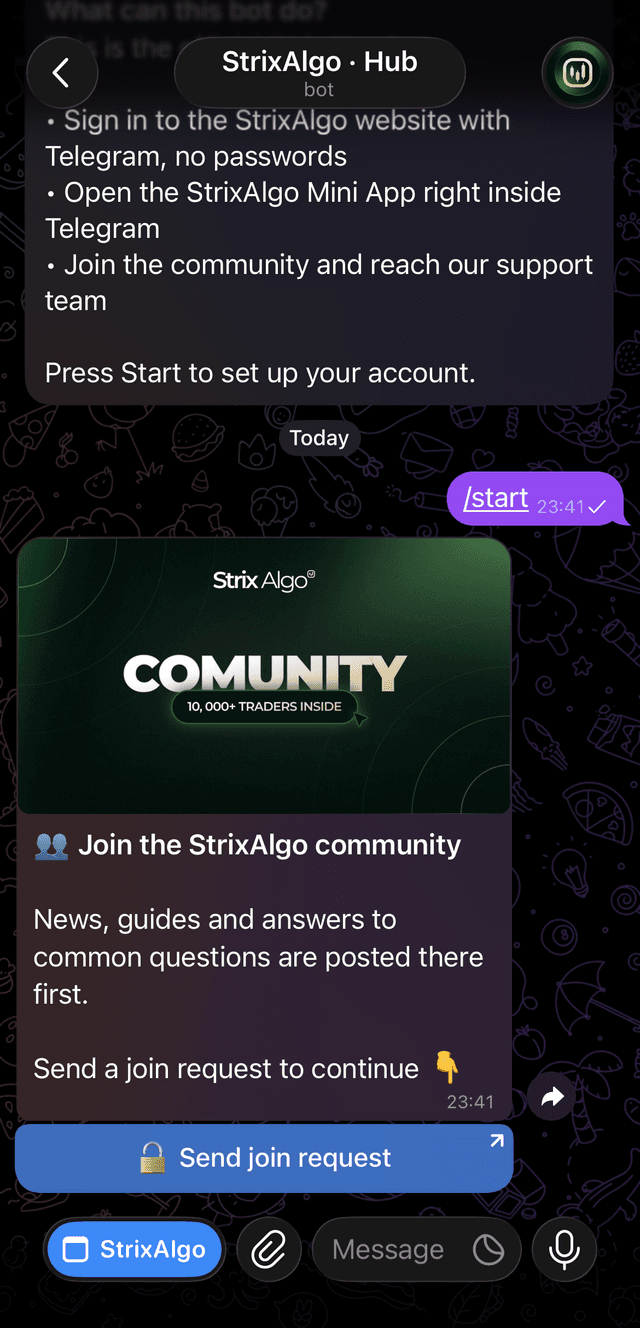
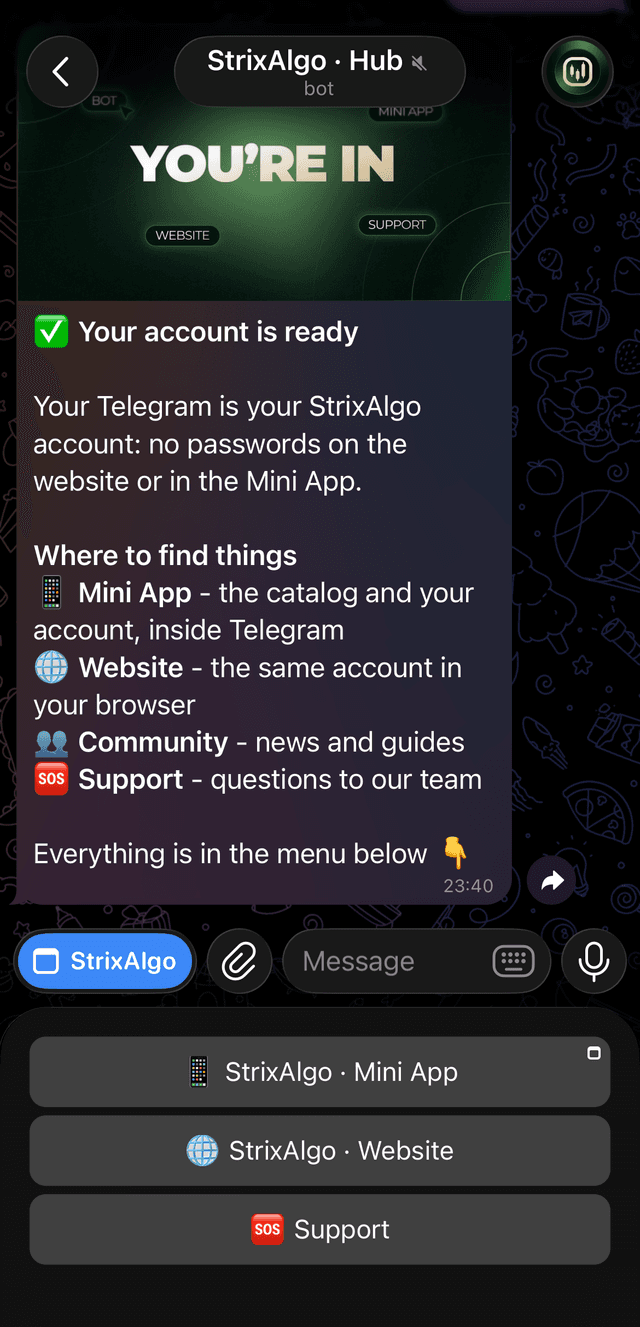
Your StrixAlgo account
Your Telegram is your account - no passwords. Press Sign up on strixalgo.com, land in our bot, press Start, join the community - done. Your browser tab is signed in automatically.
Step 1 · On strixalgo.com + Telegram · ~2 minutes
Get your free 30-day license
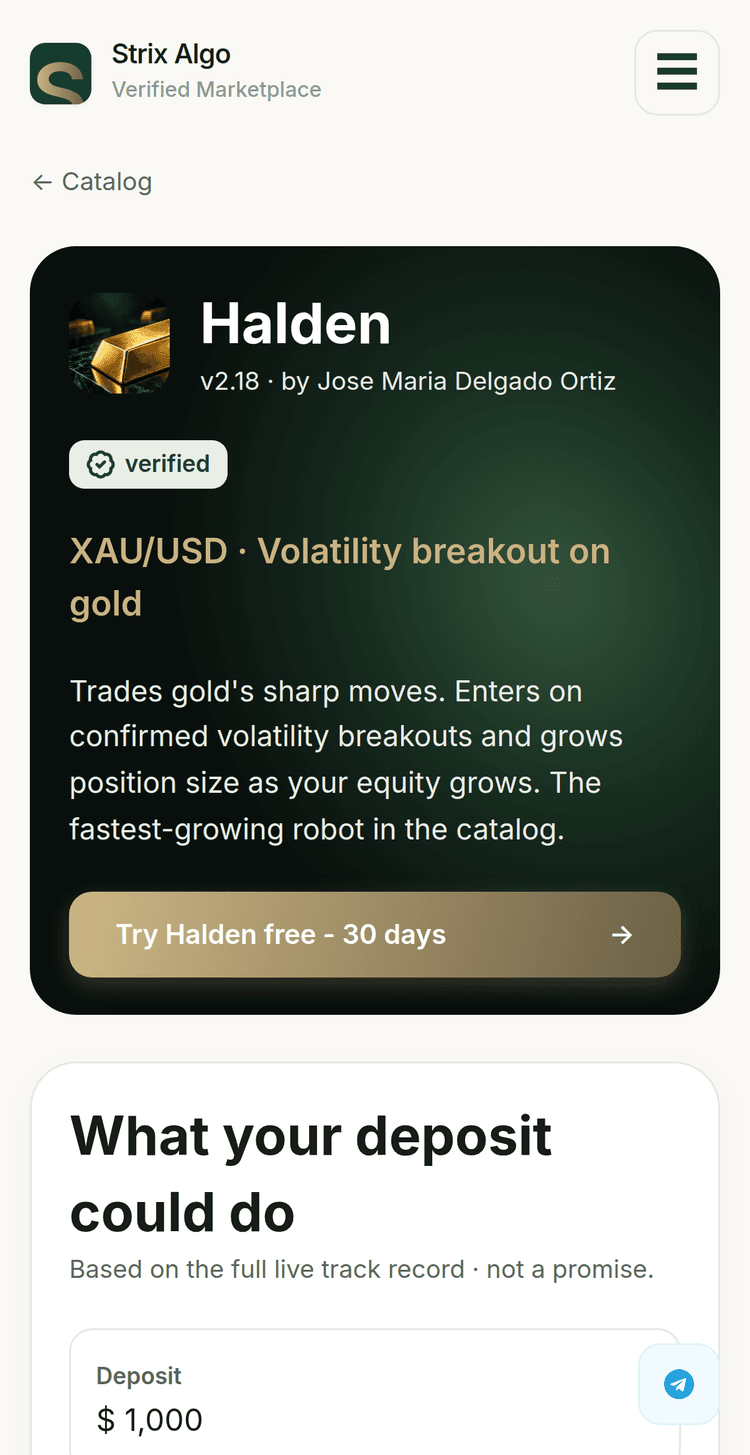
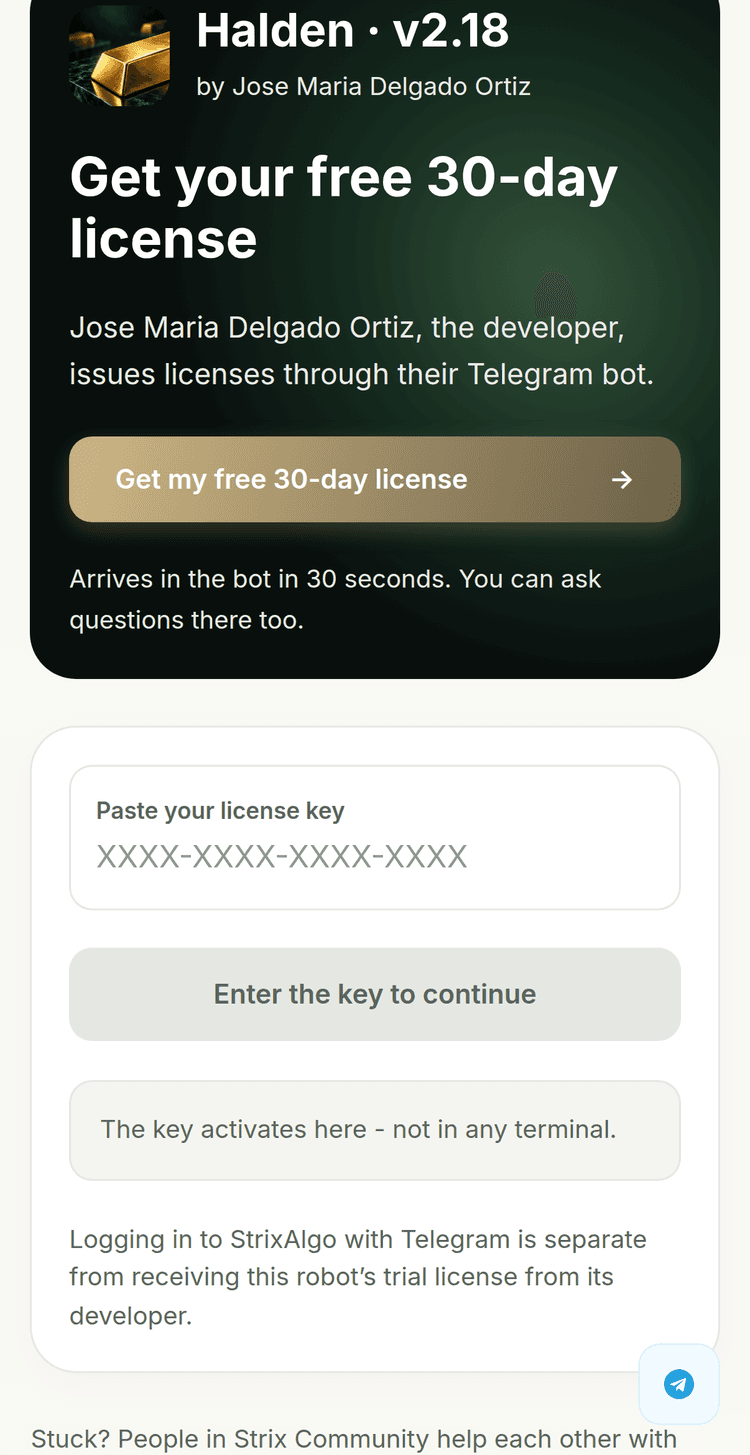
On the robot's page, press Try it free - 30 days. The Connect screen opens on step 1 - press Get my free 30-day license. You'll be taken to a short chat with the robot's developer in Telegram - they issue your personal license key.
Missing source media
Screenshot not attached
img/01-jose-bot-intro.png
Missing source media
Screenshot not attached
img/01-jose-bot-get-license.png
Missing source media
Screenshot not attached
img/01-jose-bot-key-issued.png
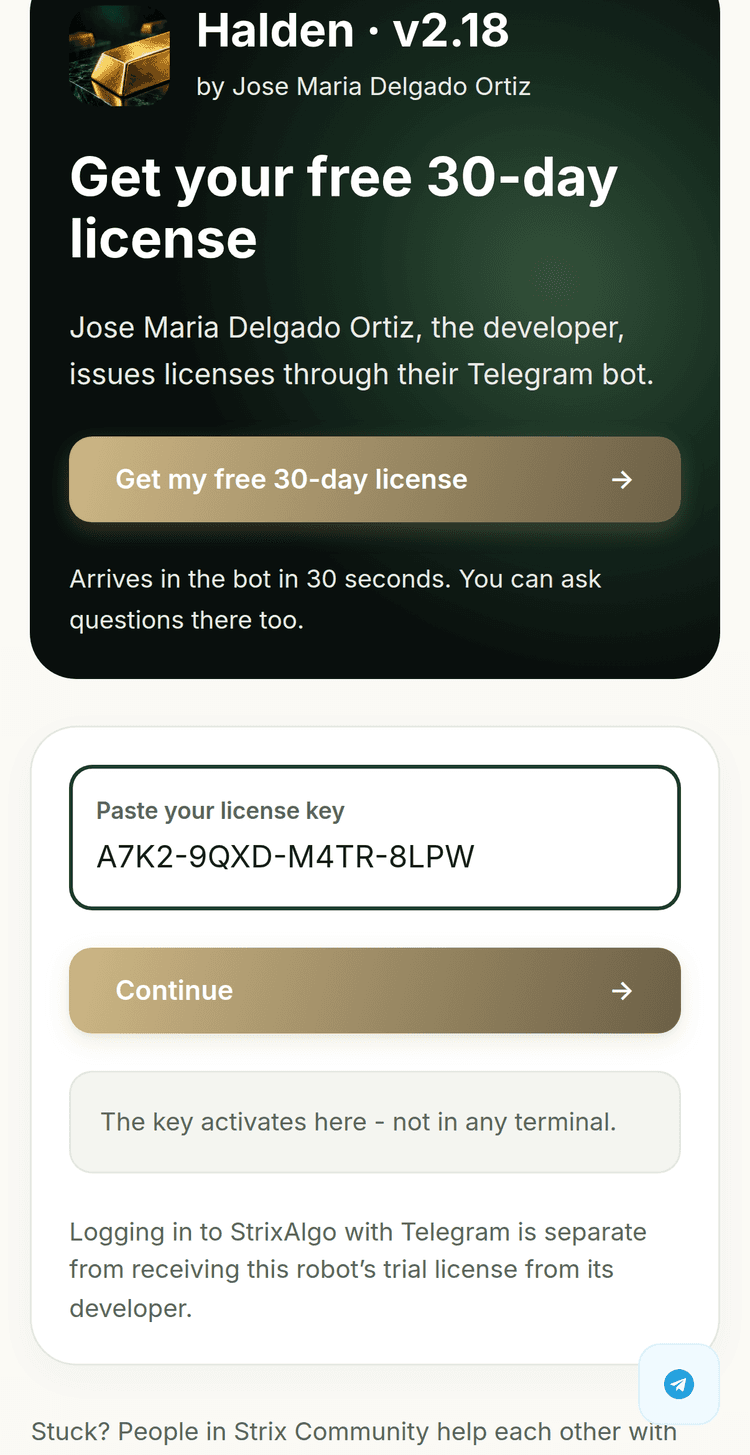
The key activates on the platform - not in any terminal. Now it needs a trading account to run on.
Step 2 · At the broker · ~10 minutes
Register your broker account at Ultima Markets
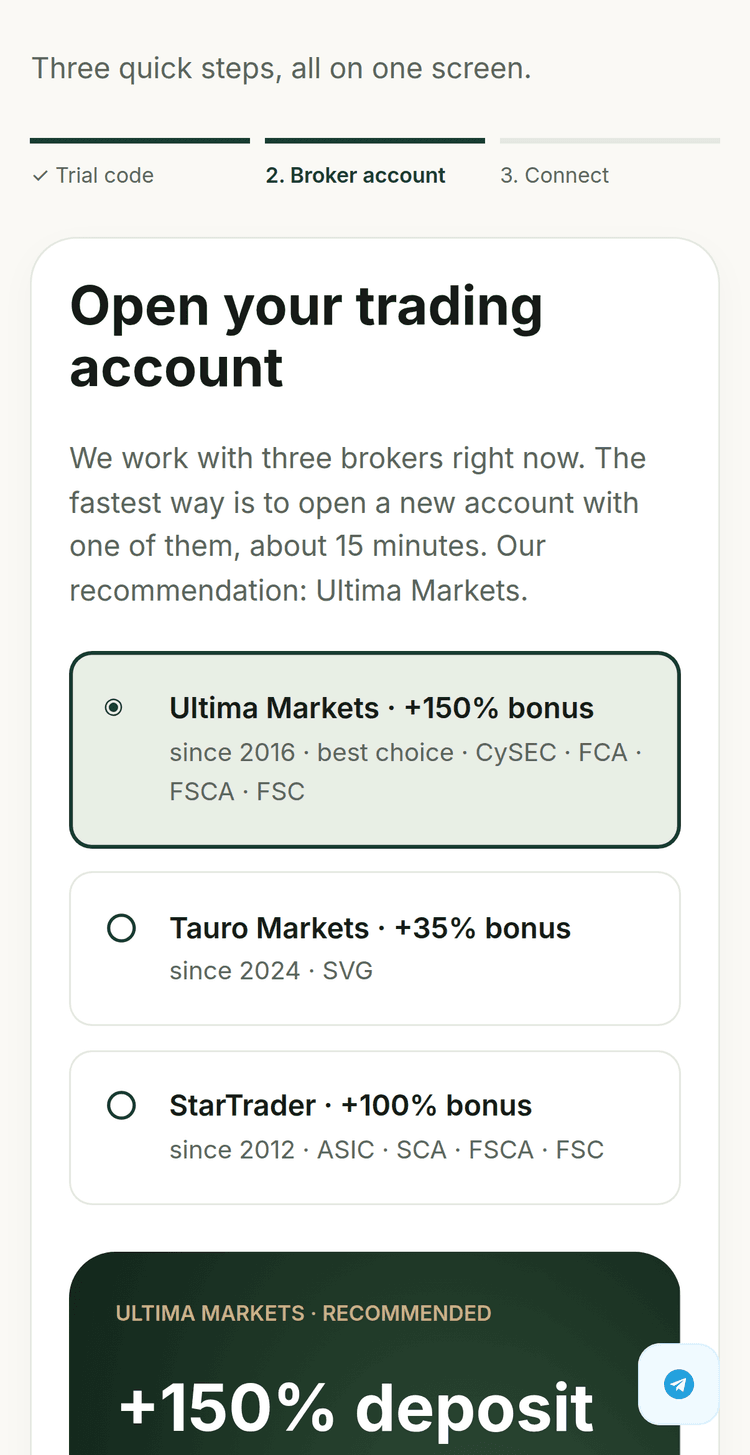
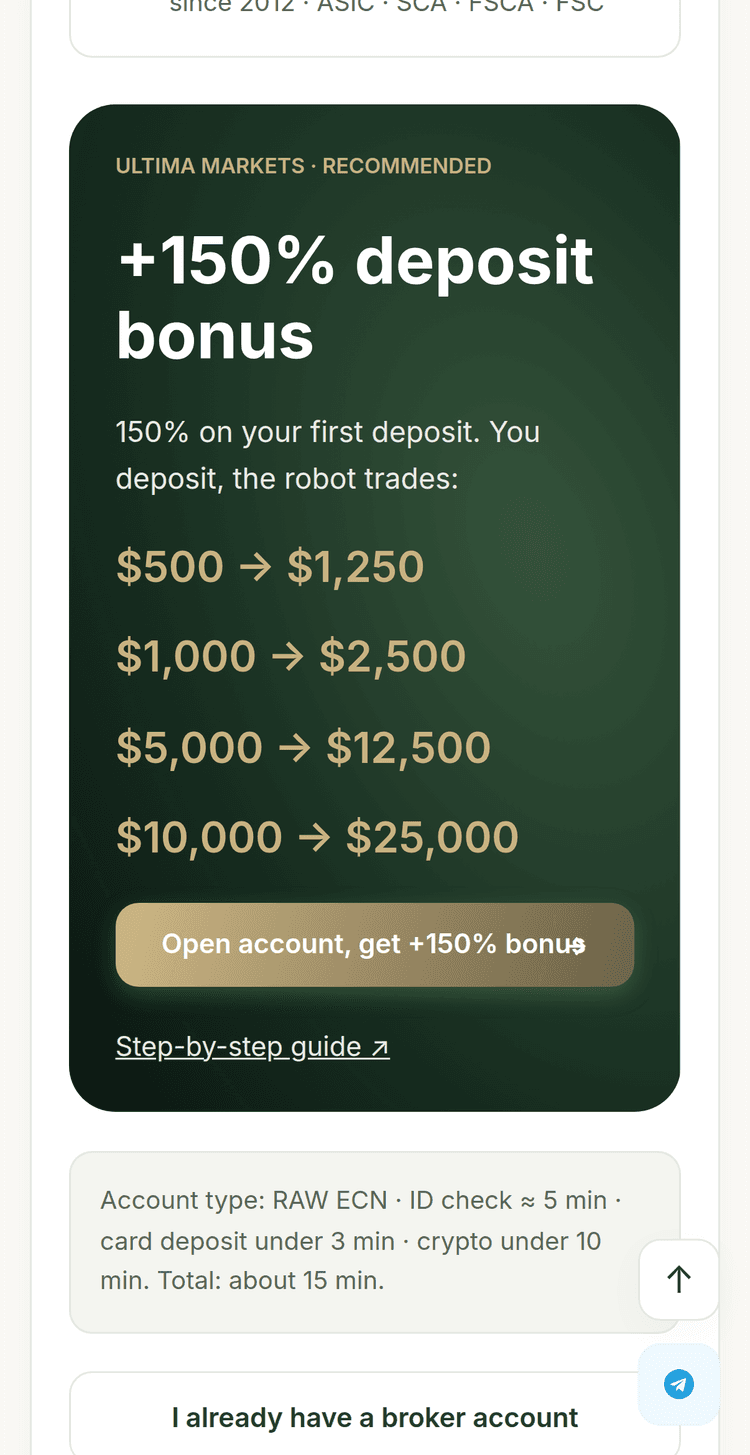
On the Connect screen, step 2 lists the three partner brokers - Ultima Markets is pre-selected as best choice. Press Open account, get +150% bonus - it opens Ultima's signup with your bonus attached. Already have a broker account? There's a link for that right under the button.
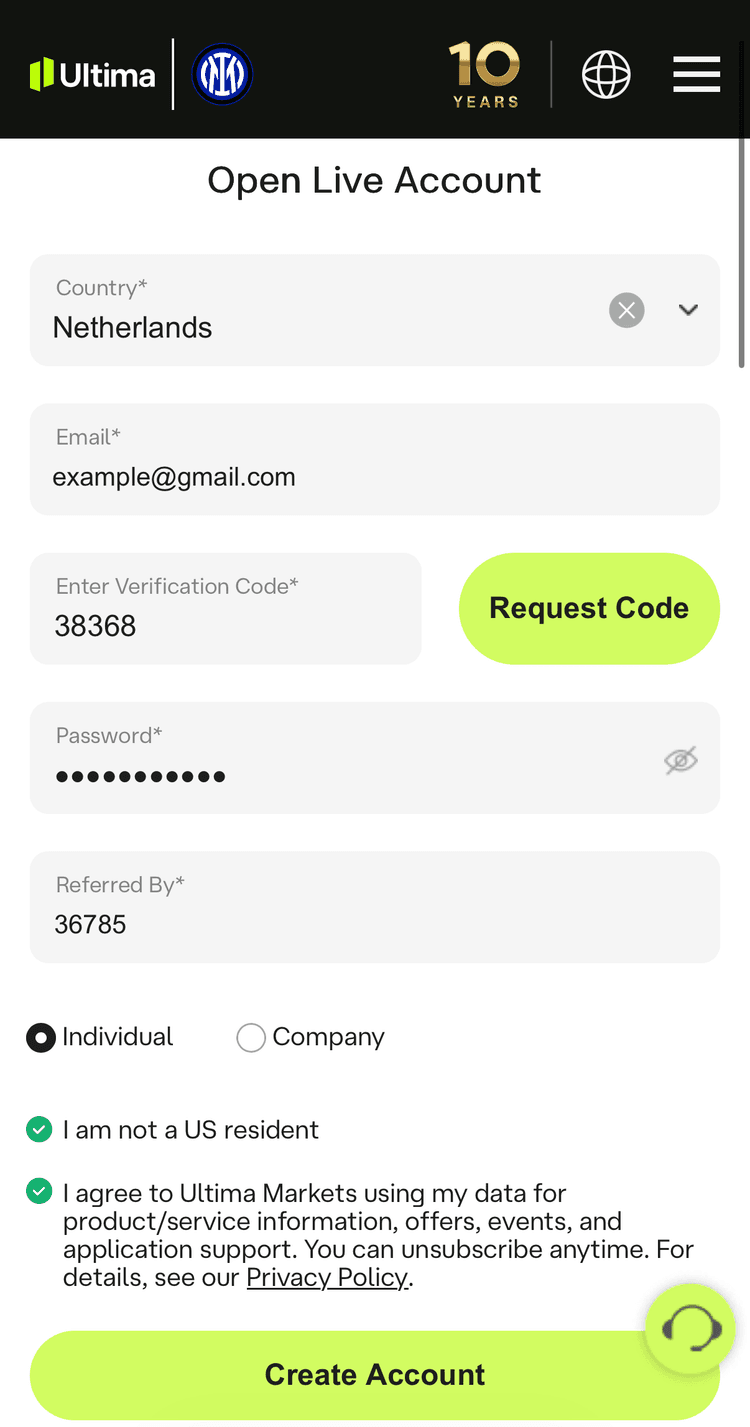
On that same first page there is a “Referred By” field. Enter: 36785
This makes sure your bonus lands without delays or support tickets.
Along the way the signup asks to pre-configure your first trading account. Pick:
Account type: RAW ECN - look for the big RAW tile with a small ECN label inside it
Leverage: 1:500
Currency: any works, but we recommend USD
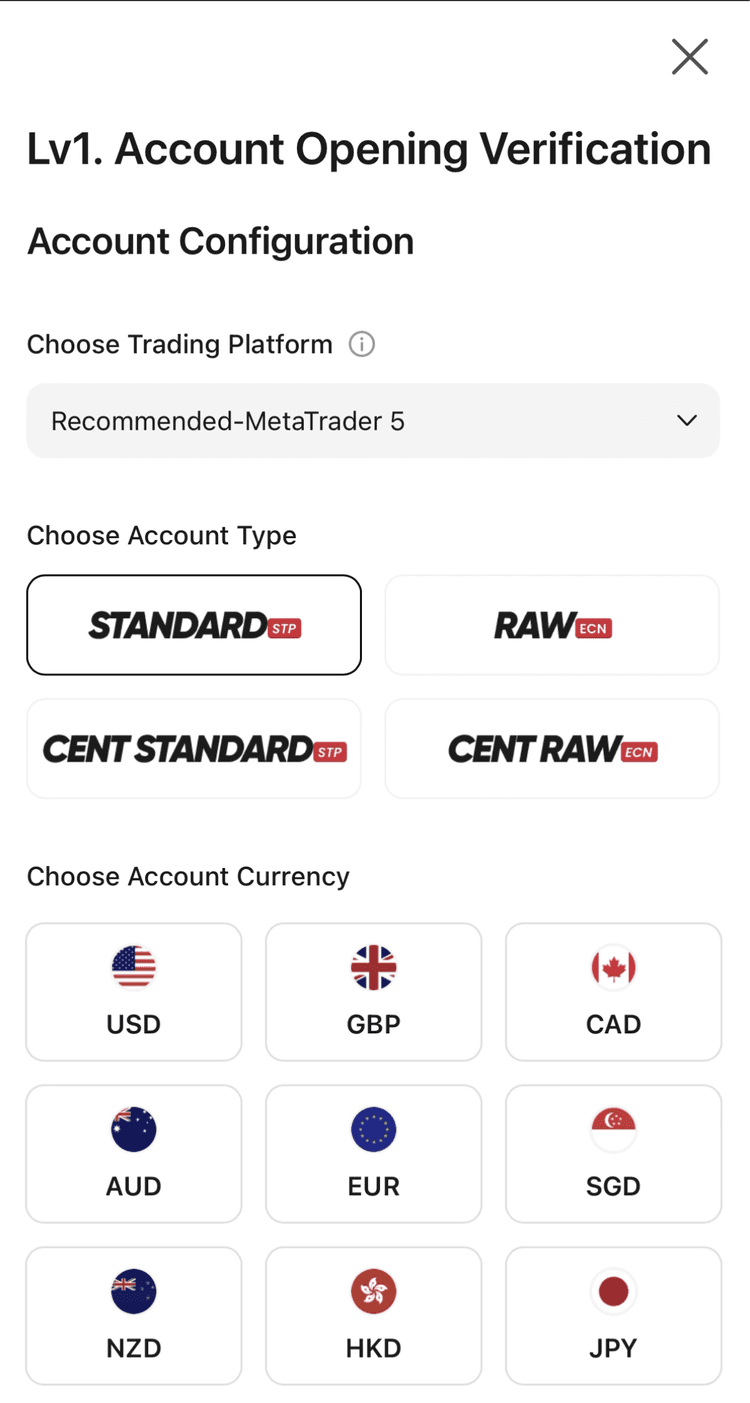
Pending is normal. It goes Live after verification + first deposit - the next two steps.
Step 3 · At the broker · ~5 minutes
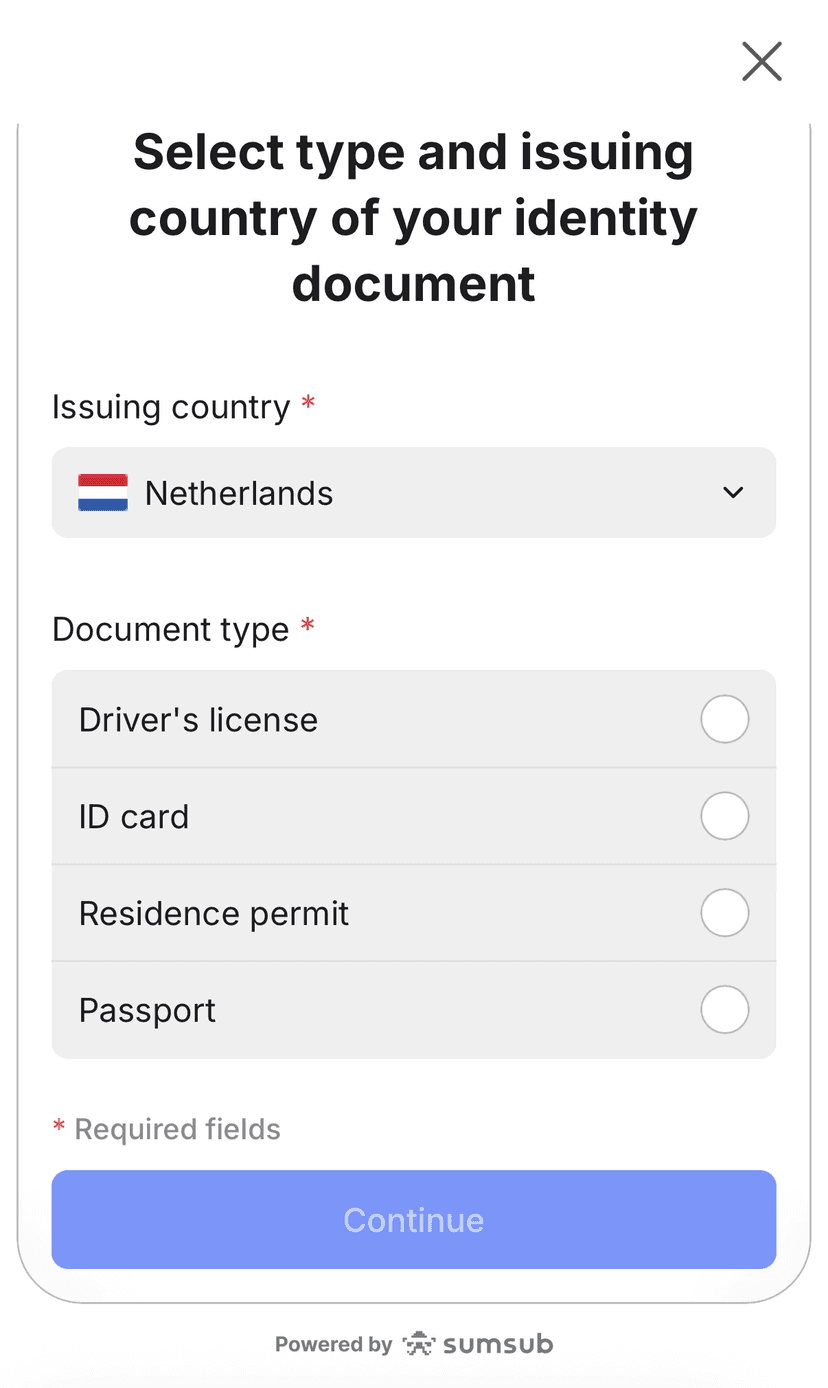
Verify your identity
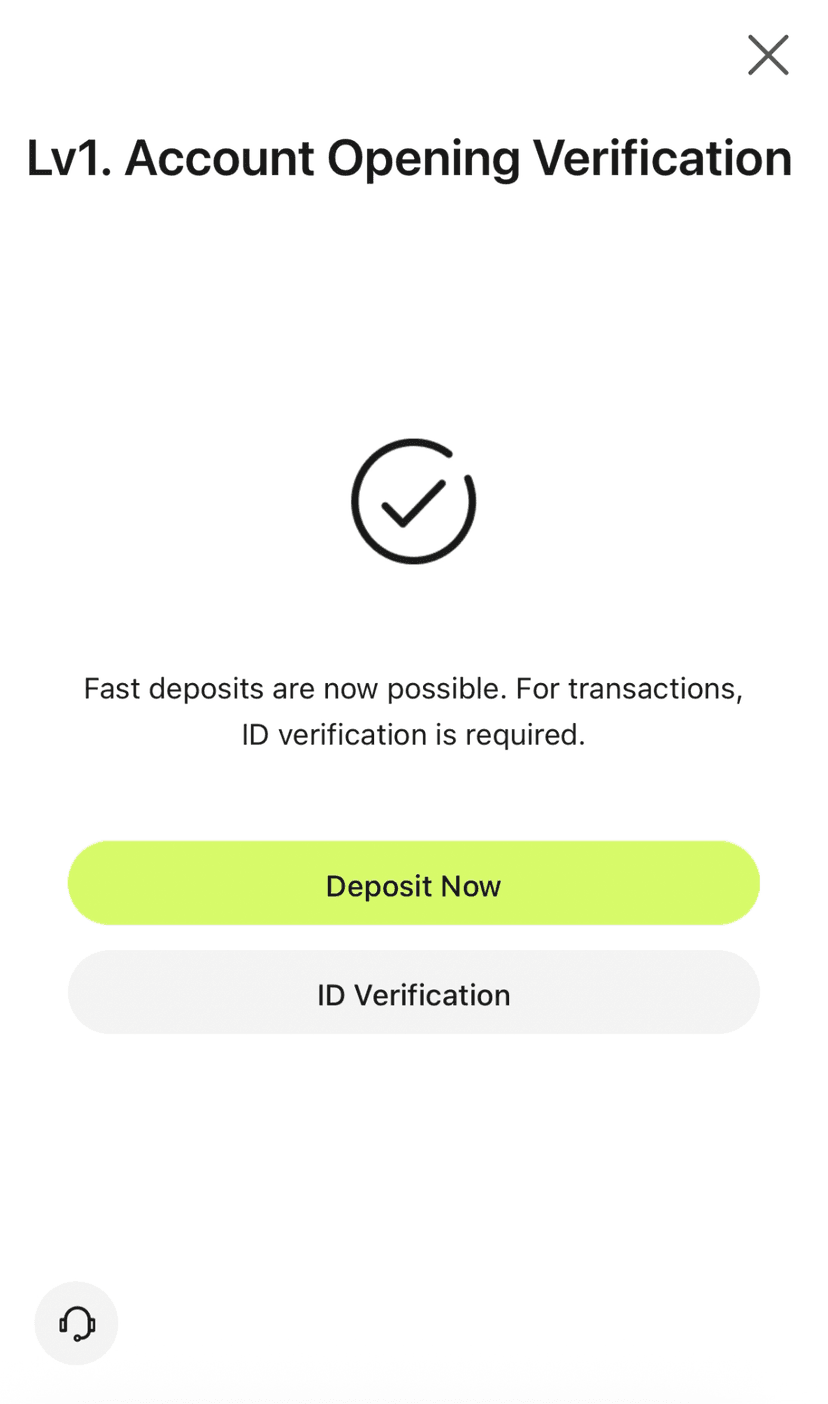
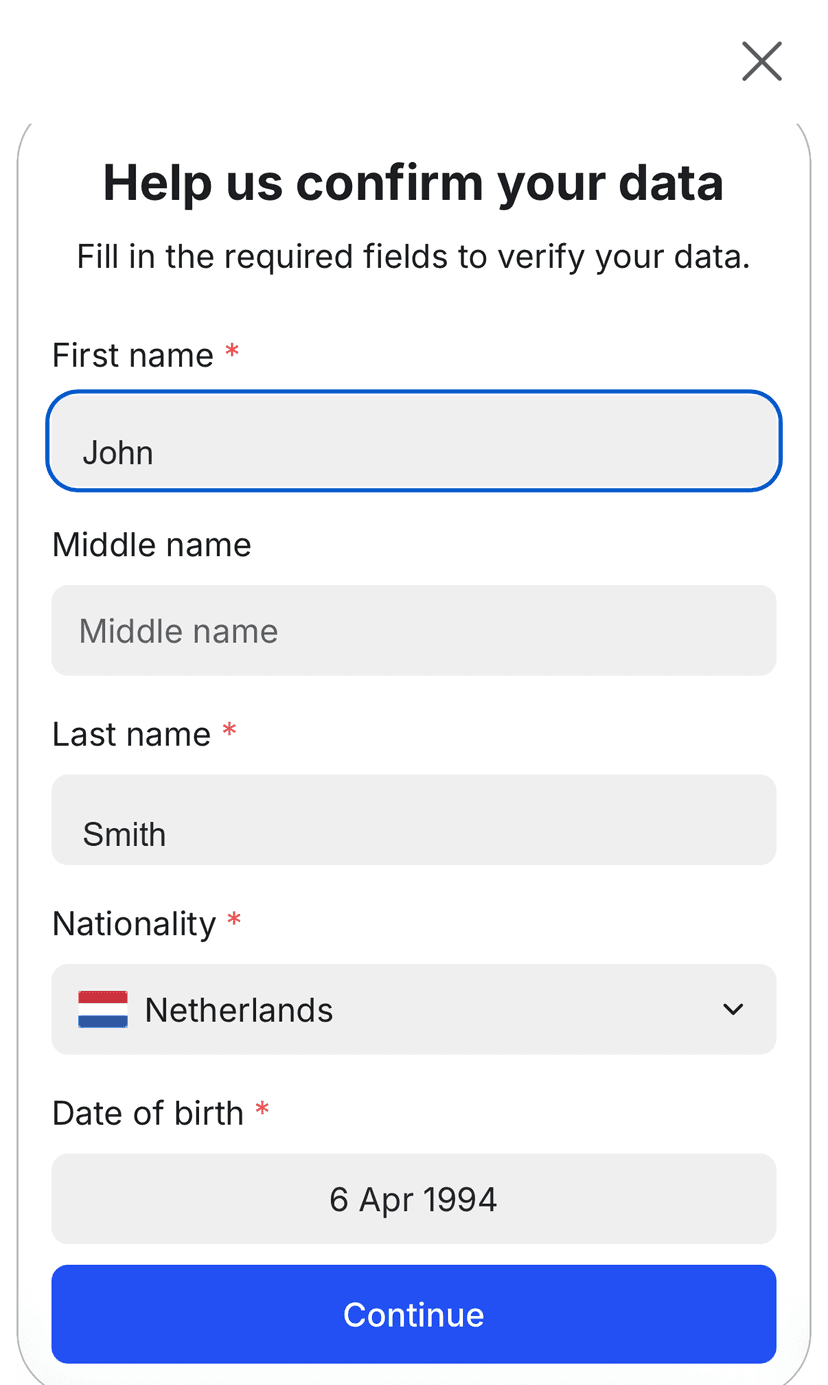
Right after signup Ultima asks to confirm who you are - two quick stages: confirm your data, then attach a document. People rush this step and then wait the longest. Take a minute:
Use documents with your real name - it must match the account.
Make sure photos are sharp, all corners visible.
Same rules at every licensed broker - and what keeps client funds protected.
Step 4 · At the broker · card 1–3 min / crypto 5–10 min
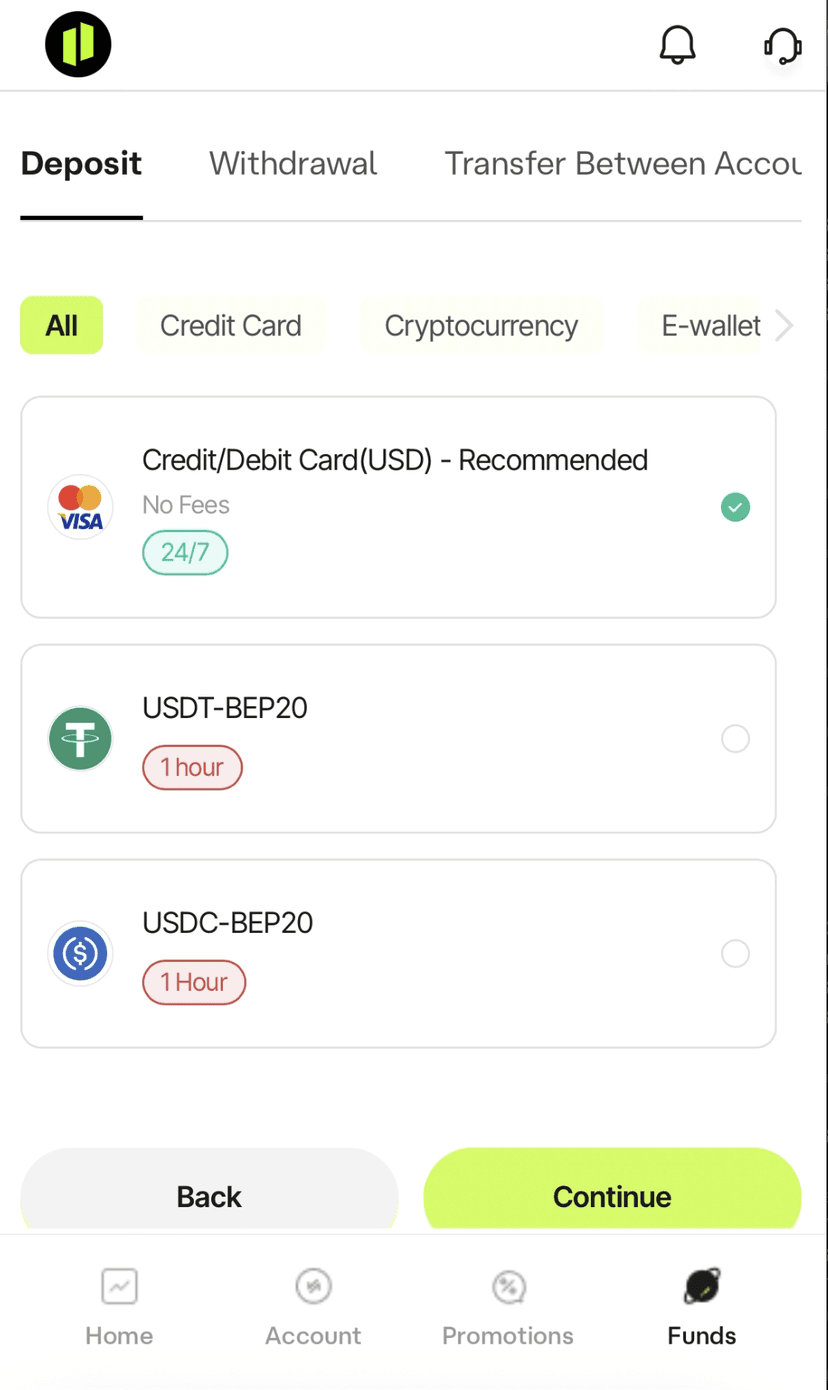
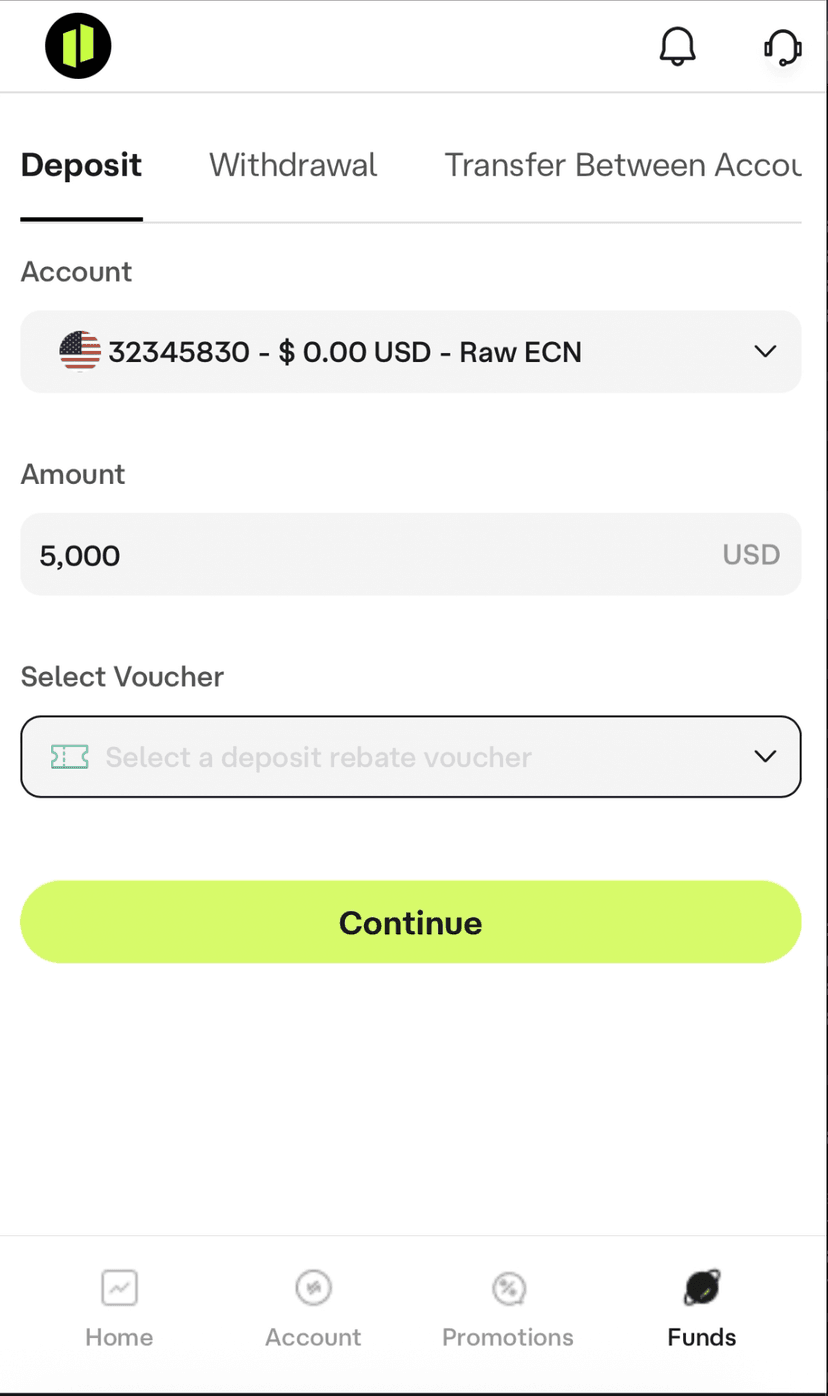
Fund your account
A trading account won't go Live while it's empty. Make your first deposit from the client area.
Step 5 · At the broker · ~1 minute
Claim your +150% deposit bonus
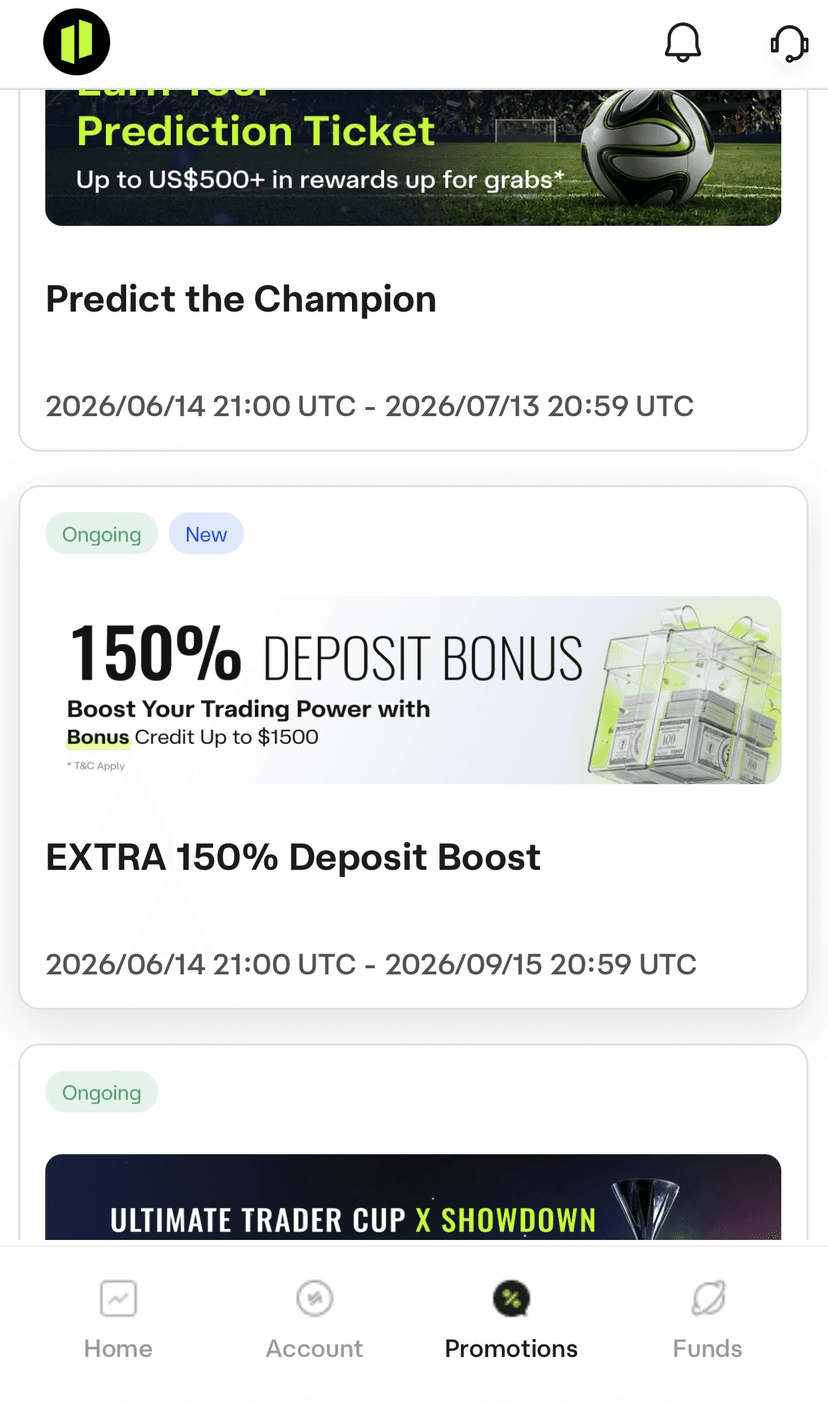
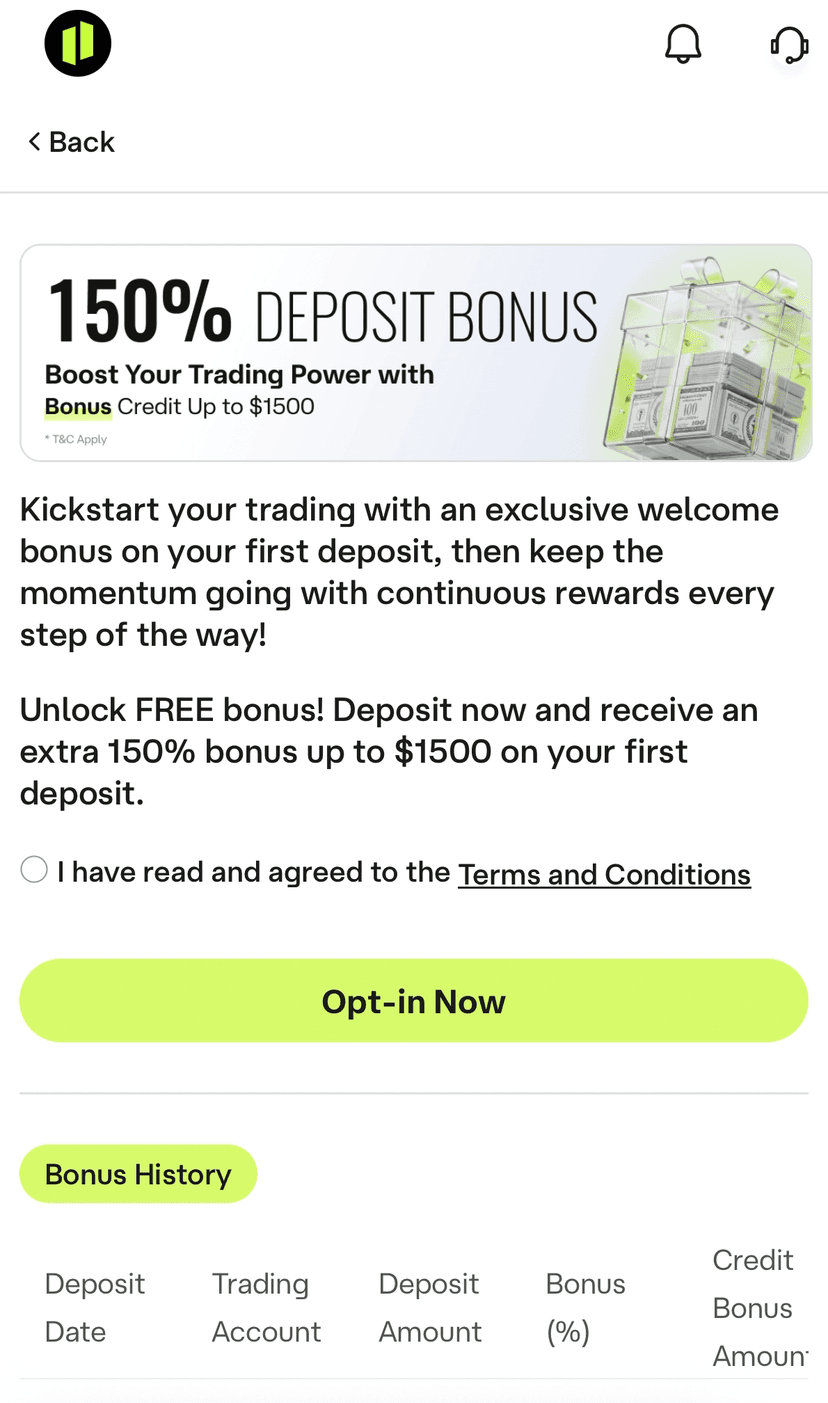
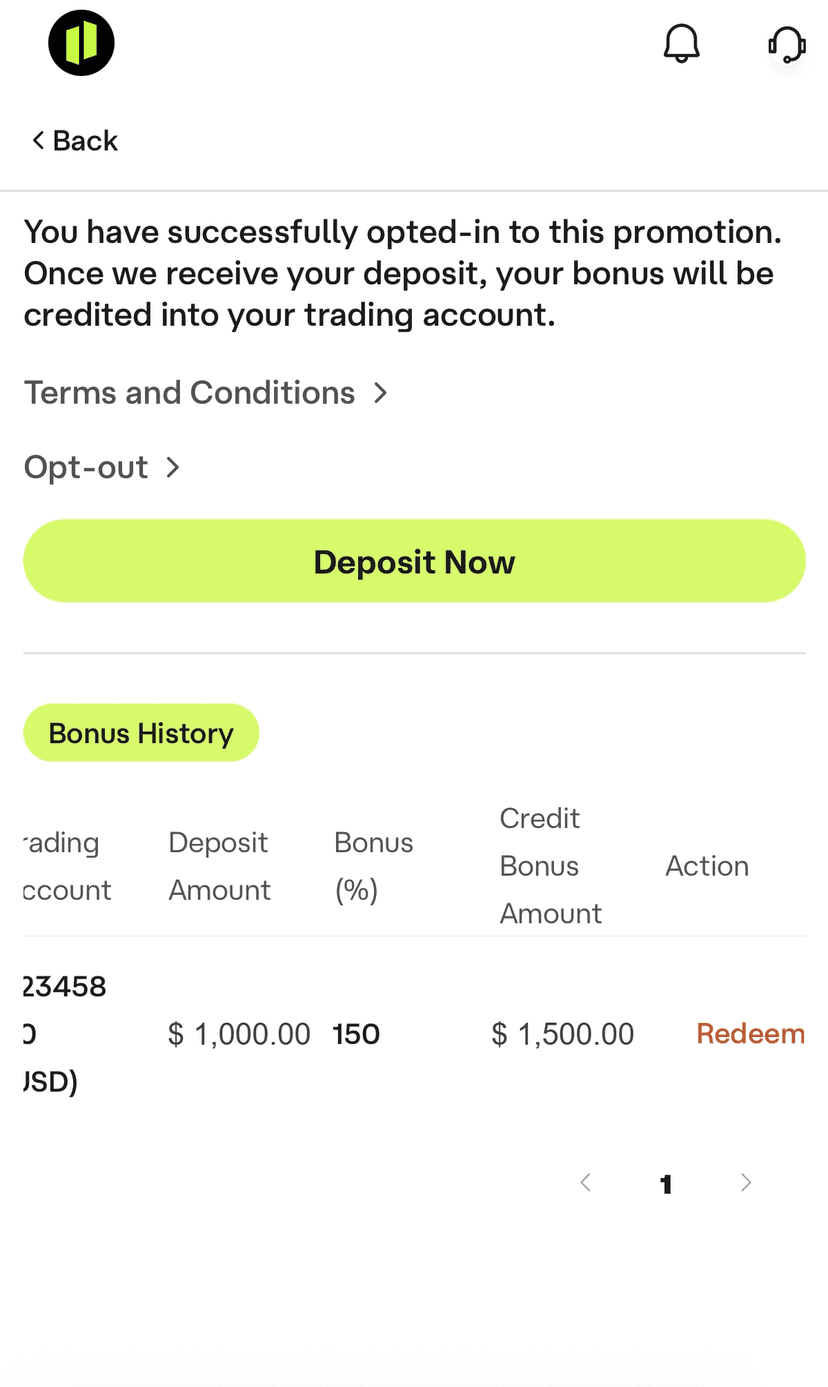
Ultima Markets gives a 150% bonus, but you have to claim it yourself. Before or after the deposit, the order doesn't matter:
In your Ultima client area, open the Promotions tab
Click the bonus tile
Press Opt-in, then Redeem
150% on your first deposit.
$1,000€908 → robot works with $2,500€2,270
$5,000€4,540 → robot works with $12,500€11,349
$10,000€9,079 → robot works with $25,000€22,698
Step 6 · Your inbox · arrives when the account goes Live
Receive your MT5 credentials
As soon as your MT5 account is ready to trade - status Live - the broker sends three things to your email:
MT5 Login - your trading account number
MT5 Password
MT5 Server
Usually right after verification + first deposit; occasionally a bit longer - that's normal.
Keep this email - the login number is what you'll enter on the platform in the next step.

Step 7 · Back on strixalgo.com · ~1 minute
Connect it on the platform
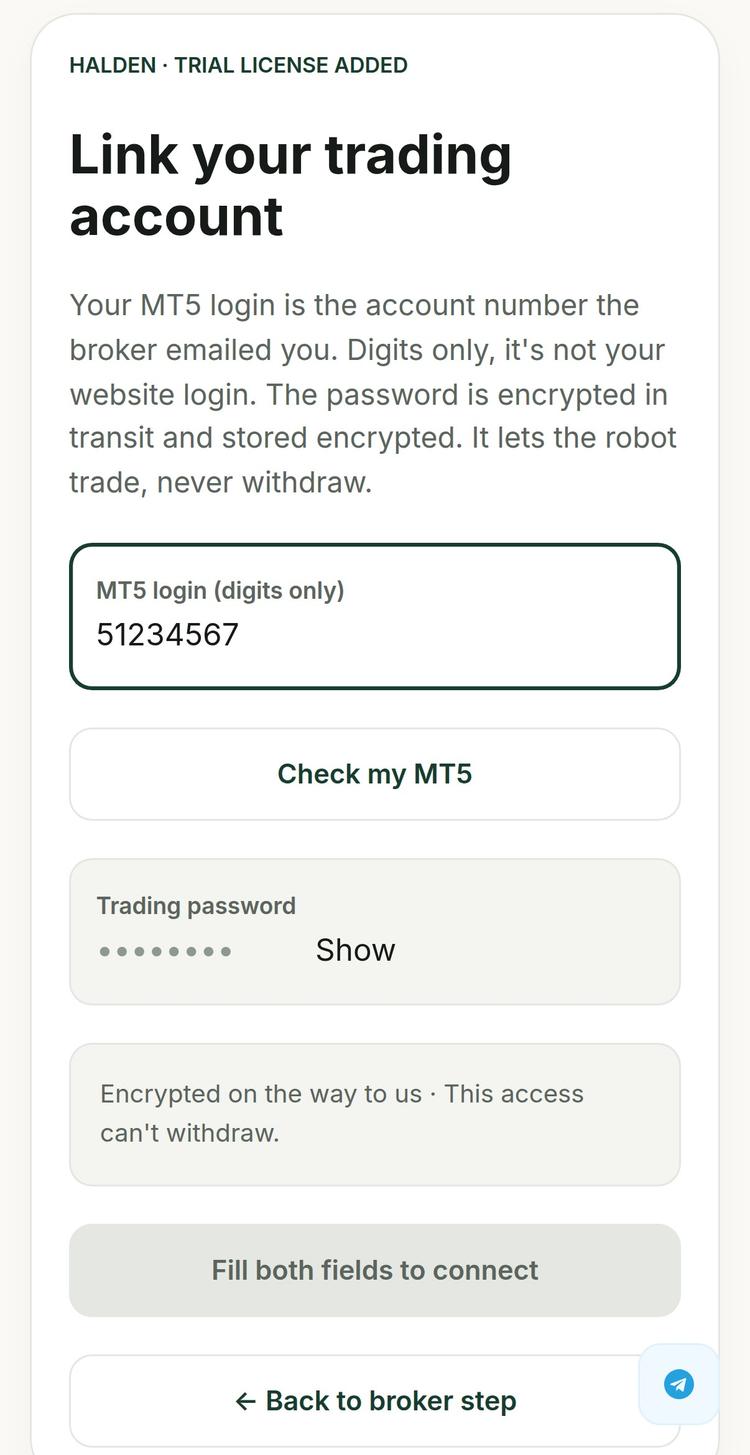
Back on the Connect screen: your license key is already in place from Step 1 - press My account is ready, last step. Then it's three moves: MT5 login → Check my MT5 → once it says Linked, enter the trading password and press the button you've been waiting for.
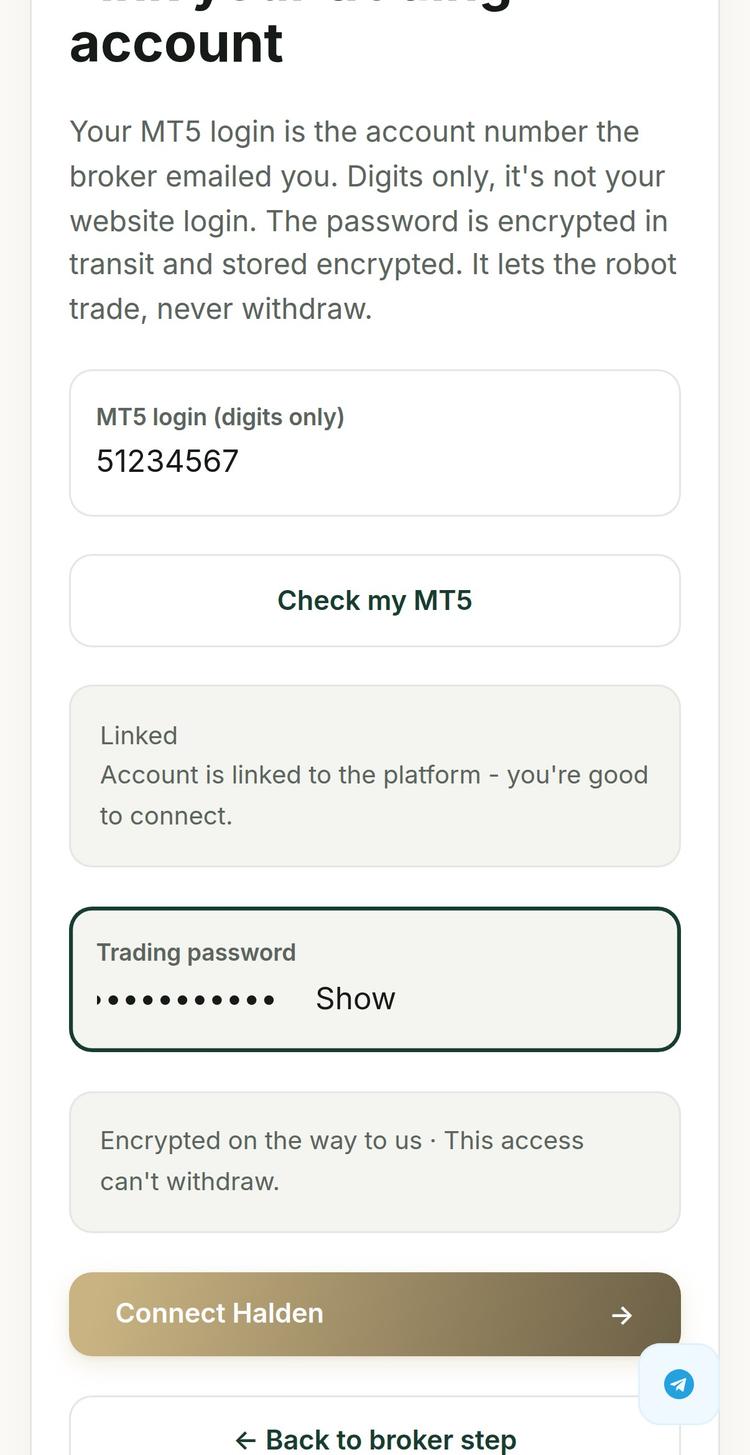
🎉 Done, your robot is live! It trades your own account at your own broker. The money never leaves it, the account is in your name, and only you can withdraw.
Quick FAQ
Why can't I just sign up in two clicks?
Licensed brokers must verify every client. It's a regulator rule. Signup is slower, but your funds are better protected.
Where is my money?
At the broker, on an account in your name. Never on our platform.
I registered but there's no MT5 login anywhere
Your trading account is still Pending. Finish verification + make a deposit → it goes Live → credentials arrive by email.
Broker account vs trading account?
Broker account = your profile on the broker's website. Trading account (MT5) = the numbered account with money inside it. The platform connects to the trading account.
Do I need to download or install MT5?
No - not at all. That's the whole point of the platform: you never deal with terminals, downloads or setup. Your license key + MT5 login number is all it takes.
Can I run the trial on a demo account?
No. The robot works on live accounts only - there are no demo accounts in this flow.
Stuck on any step? Support is online 24/7. Real people, fast response.

Step-by-step guide · Example broker: Ultima Markets
From trial key to a robot live on your account.
Free trial key → broker account → deposit bonus → connect. The other two brokers are nearly identical.
5 minutes of reading = 95% of the questions people get stuck on. Start with these two.
Before you start - what to expect
From ~15 minutes - simple, but not instant. The time depends on verification (KYC - usually minutes) and on how you fund:
Deposit method · Time to arrive
Bank card · 1–3 min
Crypto · 5–10 min
ID verification is required by regulators. The broker isn't being difficult, and it's part of what keeps your money safe.
Two kinds of “account”. This is where most people get lost.
Two separate things:
1 · Broker account - your personal profile
Your client area on the broker's site - email + password, in your name. Verification, deposits and withdrawals happen here. It has no MT5 login number.
2 · Trading account - the MT5 account
Lives inside the broker account - the numbered account with the balance. Its MT5 login (a number) is what you connect to the platform.
What does it look like?
Broker account · your personal profile
John Smith
john@gmail.com · verified · one per person
Total at the broker
$27,580
the sum of the trading accounts inside
Inside it - trading accounts (MT5) × 2
MT5
#5214307 ← connect this
RAW ECN · 1:500 · USD
$2,500
MT5
#5198112
Standard · 1:200 · USD
$25,080
One broker account - the outer shell - holds any number of trading accounts inside. Each has its own MT5 number, settings and balance. That number is what you connect.
Your first trading account is created during signup. You just pick its settings.
Pending → KYC + first deposit → Live → MT5 credentials arrive by email
That email is what you're waiting for - those credentials connect your robot.
Step 0 · In Telegram · ~15 seconds · Skip if you're already signed in
Your StrixAlgo account
Your Telegram is your account - no passwords. Press Sign up on strixalgo.com, land in our bot, press Start, join the community - done. Your browser tab is signed in automatically.
Step 1 · On strixalgo.com + Telegram · ~2 minutes
Get your free 30-day license
On the robot's page, press Try it free - 30 days. The Connect screen opens on step 1 - press Get my free 30-day license. You'll be taken to a short chat with the robot's developer in Telegram - they issue your personal license key.
Missing source media
Screenshot not attached
img/01-jose-bot-intro.png
Missing source media
Screenshot not attached
img/01-jose-bot-get-license.png
Missing source media
Screenshot not attached
img/01-jose-bot-key-issued.png
The key activates on the platform - not in any terminal. Now it needs a trading account to run on.
Step 2 · At the broker · ~10 minutes
Register your broker account at Ultima Markets
On the Connect screen, step 2 lists the three partner brokers - Ultima Markets is pre-selected as best choice. Press Open account, get +150% bonus - it opens Ultima's signup with your bonus attached. Already have a broker account? There's a link for that right under the button.
On that same first page there is a “Referred By” field. Enter: 36785
This makes sure your bonus lands without delays or support tickets.
Along the way the signup asks to pre-configure your first trading account. Pick:
Account type: RAW ECN - look for the big RAW tile with a small ECN label inside it
Leverage: 1:500
Currency: any works, but we recommend USD
Pending is normal. It goes Live after verification + first deposit - the next two steps.
Step 3 · At the broker · ~5 minutes
Verify your identity
Right after signup Ultima asks to confirm who you are - two quick stages: confirm your data, then attach a document. People rush this step and then wait the longest. Take a minute:
Use documents with your real name - it must match the account.
Make sure photos are sharp, all corners visible.
Same rules at every licensed broker - and what keeps client funds protected.
Step 4 · At the broker · card 1–3 min / crypto 5–10 min
Fund your account
A trading account won't go Live while it's empty. Make your first deposit from the client area.
Step 5 · At the broker · ~1 minute
Claim your +150% deposit bonus
Ultima Markets gives a 150% bonus, but you have to claim it yourself. Before or after the deposit, the order doesn't matter:
In your Ultima client area, open the Promotions tab
Click the bonus tile
Press Opt-in, then Redeem
150% on your first deposit.
$1,000€908 → robot works with $2,500€2,270
$5,000€4,540 → robot works with $12,500€11,349
$10,000€9,079 → robot works with $25,000€22,698
Step 6 · Your inbox · arrives when the account goes Live
Receive your MT5 credentials
As soon as your MT5 account is ready to trade - status Live - the broker sends three things to your email:
MT5 Login - your trading account number
MT5 Password
MT5 Server
Usually right after verification + first deposit; occasionally a bit longer - that's normal.
Keep this email - the login number is what you'll enter on the platform in the next step.
Step 7 · Back on strixalgo.com · ~1 minute
Connect it on the platform
Back on the Connect screen: your license key is already in place from Step 1 - press My account is ready, last step. Then it's three moves: MT5 login → Check my MT5 → once it says Linked, enter the trading password and press the button you've been waiting for.
🎉 Done, your robot is live! It trades your own account at your own broker. The money never leaves it, the account is in your name, and only you can withdraw.
Quick FAQ
Why can't I just sign up in two clicks?
Licensed brokers must verify every client. It's a regulator rule. Signup is slower, but your funds are better protected.
Where is my money?
At the broker, on an account in your name. Never on our platform.
I registered but there's no MT5 login anywhere
Your trading account is still Pending. Finish verification + make a deposit → it goes Live → credentials arrive by email.
Broker account vs trading account?
Broker account = your profile on the broker's website. Trading account (MT5) = the numbered account with money inside it. The platform connects to the trading account.
Do I need to download or install MT5?
No - not at all. That's the whole point of the platform: you never deal with terminals, downloads or setup. Your license key + MT5 login number is all it takes.
Can I run the trial on a demo account?
No. The robot works on live accounts only - there are no demo accounts in this flow.
Stuck on any step? Support is online 24/7. Real people, fast response.
Step-by-step guide · Example broker: Ultima Markets
From trial key to a robot live on your account.
Free trial key → broker account → deposit bonus → connect. The other two brokers are nearly identical.
5 minutes of reading = 95% of the questions people get stuck on. Start with these two.
Before you start - what to expect
From ~15 minutes - simple, but not instant. The time depends on verification (KYC - usually minutes) and on how you fund:
Deposit method · Time to arrive
Bank card · 1–3 min
Crypto · 5–10 min
ID verification is required by regulators. The broker isn't being difficult, and it's part of what keeps your money safe.
Two kinds of “account”. This is where most people get lost.
Two separate things:
1 · Broker account - your personal profile
Your client area on the broker's site - email + password, in your name. Verification, deposits and withdrawals happen here. It has no MT5 login number.
2 · Trading account - the MT5 account
Lives inside the broker account - the numbered account with the balance. Its MT5 login (a number) is what you connect to the platform.
What does it look like?
Broker account · your personal profile
John Smith
john@gmail.com · verified · one per person
Total at the broker
$27,580
the sum of the trading accounts inside
Inside it - trading accounts (MT5) × 2
MT5
#5214307 ← connect this
RAW ECN · 1:500 · USD
$2,500
MT5
#5198112
Standard · 1:200 · USD
$25,080
One broker account - the outer shell - holds any number of trading accounts inside. Each has its own MT5 number, settings and balance. That number is what you connect.
Your first trading account is created during signup. You just pick its settings.
Pending → KYC + first deposit → Live → MT5 credentials arrive by email
That email is what you're waiting for - those credentials connect your robot.
Step 0 · In Telegram · ~15 seconds · Skip if you're already signed in
Your StrixAlgo account
Your Telegram is your account - no passwords. Press Sign up on strixalgo.com, land in our bot, press Start, join the community - done. Your browser tab is signed in automatically.
Step 1 · On strixalgo.com + Telegram · ~2 minutes
Get your free 30-day license
On the robot's page, press Try it free - 30 days. The Connect screen opens on step 1 - press Get my free 30-day license. You'll be taken to a short chat with the robot's developer in Telegram - they issue your personal license key.
Missing source media
Screenshot not attached
img/01-jose-bot-intro.png
Missing source media
Screenshot not attached
img/01-jose-bot-get-license.png
Missing source media
Screenshot not attached
img/01-jose-bot-key-issued.png
The key activates on the platform - not in any terminal. Now it needs a trading account to run on.
Step 2 · At the broker · ~10 minutes
Register your broker account at Ultima Markets
On the Connect screen, step 2 lists the three partner brokers - Ultima Markets is pre-selected as best choice. Press Open account, get +150% bonus - it opens Ultima's signup with your bonus attached. Already have a broker account? There's a link for that right under the button.
On that same first page there is a “Referred By” field. Enter: 36785
This makes sure your bonus lands without delays or support tickets.
Along the way the signup asks to pre-configure your first trading account. Pick:
Account type: RAW ECN - look for the big RAW tile with a small ECN label inside it
Leverage: 1:500
Currency: any works, but we recommend USD
Pending is normal. It goes Live after verification + first deposit - the next two steps.
Step 3 · At the broker · ~5 minutes
Verify your identity
Right after signup Ultima asks to confirm who you are - two quick stages: confirm your data, then attach a document. People rush this step and then wait the longest. Take a minute:
Use documents with your real name - it must match the account.
Make sure photos are sharp, all corners visible.
Same rules at every licensed broker - and what keeps client funds protected.
Step 4 · At the broker · card 1–3 min / crypto 5–10 min
Fund your account
A trading account won't go Live while it's empty. Make your first deposit from the client area.
Step 5 · At the broker · ~1 minute
Claim your +150% deposit bonus
Ultima Markets gives a 150% bonus, but you have to claim it yourself. Before or after the deposit, the order doesn't matter:
In your Ultima client area, open the Promotions tab
Click the bonus tile
Press Opt-in, then Redeem
150% on your first deposit.
$1,000€908 → robot works with $2,500€2,270
$5,000€4,540 → robot works with $12,500€11,349
$10,000€9,079 → robot works with $25,000€22,698
Step 6 · Your inbox · arrives when the account goes Live
Receive your MT5 credentials
As soon as your MT5 account is ready to trade - status Live - the broker sends three things to your email:
MT5 Login - your trading account number
MT5 Password
MT5 Server
Usually right after verification + first deposit; occasionally a bit longer - that's normal.
Keep this email - the login number is what you'll enter on the platform in the next step.
Step 7 · Back on strixalgo.com · ~1 minute
Connect it on the platform
Back on the Connect screen: your license key is already in place from Step 1 - press My account is ready, last step. Then it's three moves: MT5 login → Check my MT5 → once it says Linked, enter the trading password and press the button you've been waiting for.
🎉 Done, your robot is live! It trades your own account at your own broker. The money never leaves it, the account is in your name, and only you can withdraw.
Quick FAQ
Why can't I just sign up in two clicks?
Licensed brokers must verify every client. It's a regulator rule. Signup is slower, but your funds are better protected.
Where is my money?
At the broker, on an account in your name. Never on our platform.
I registered but there's no MT5 login anywhere
Your trading account is still Pending. Finish verification + make a deposit → it goes Live → credentials arrive by email.
Broker account vs trading account?
Broker account = your profile on the broker's website. Trading account (MT5) = the numbered account with money inside it. The platform connects to the trading account.
Do I need to download or install MT5?
No - not at all. That's the whole point of the platform: you never deal with terminals, downloads or setup. Your license key + MT5 login number is all it takes.
Can I run the trial on a demo account?
No. The robot works on live accounts only - there are no demo accounts in this flow.
Stuck on any step? Support is online 24/7. Real people, fast response.
